
 Facebook
 Instagram
 X (Twitter)
 TikTok
 Pinterest
 YouTube
 LinkedIn
 Threads
 Google Business Profile
 Telegram
 Discord
AutoPost AI Review (2026): Features, Pricing, Pros & Cons


Is AutoPost AI the right way to auto-post your Shopify products, or will the free plan leave you manually submitting every single post? Which plan do you actually need before automations kick in? These are the questions most merchants have before installing.
See how this app compares to all other Shopify social auto-post apps in our complete guide to the best shopify social media auto-post apps.
For this AutoPost AI review, I installed the app on a Shopify demo store, connected Facebook and Pinterest, ran the full composer flow from product picker to confirmed live post, and read all 26 public App Store reviews. Everything here is sourced from that hands-on testing and the live listing, confirmed on 2026-08-07. No invented features, no inflated praise.
What Is AutoPost AI?
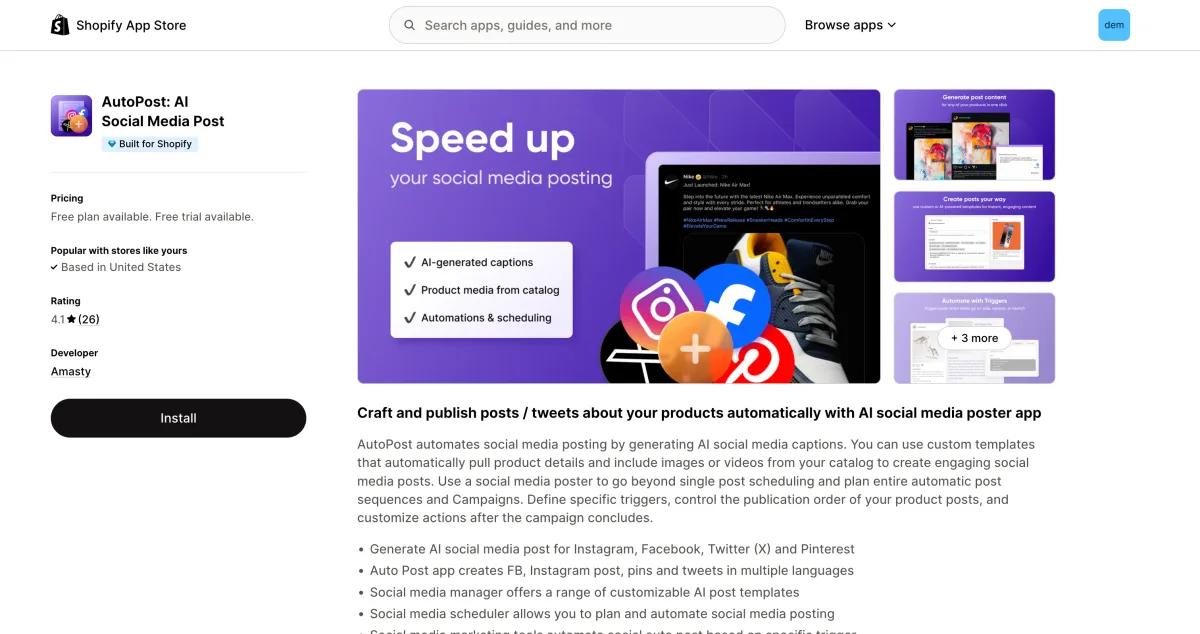
AutoPost AI is a Shopify social media poster built by Amasty, an established extension developer with years of experience in the Magento and Shopify ecosystem. The app generates ChatGPT-powered captions and lets merchants publish or schedule product content to Facebook, Instagram, X/Twitter, and Pinterest.
It launched on June 25, 2024. It is embedded directly in Shopify admin: no external domain, no separate account, no API key required. You can browse the template library and explore the calendar before you connect a single social channel. The app targets Shopify merchants who want a clean, accessible auto-poster without a complicated setup.
AutoPost AI Review: Quick Verdict
AutoPost AI delivers what it promises for merchants posting to its four supported networks. The AI captions are accurate, the setup is genuinely clean, and Amasty is a credible developer. The hard limits are the network count (4 only) and the paywall on all automations.
| Criteria | Verdict |
|---|---|
| Best for | Stores posting to Facebook, Instagram, X/ |
| Not ideal for | Stores needing TikTok, YouTube, or LinkedIn; merchants who want auto-posting on a free plan |
| Starting price | $0 free plan (manual only); $9.99/ |
| Free plan / trial | Free plan (5 posts/ |
| Networks supported | 4: Facebook, Instagram, X/ |
| Most valuable features | Accurate AI captions, template flexibility dial, live preview composer, product variable templates |
| Ease of use | 8/ |
| Feature richness | 5/ |
| Reliability (testing + reviews) | 6/ |
| App Store rating | 4.1/ |
AutoPost AI Features & Functionality
AutoPost AI covers the core posting workflow cleanly, but is narrower in feature depth than most rivals in the category.
1. AI Caption Generation
ChatGPT/OpenAI powers the caption generator. I tested this live: every generated caption included the correct product name, the correct product URL, relevant hashtags, and appropriate emojis. That accuracy is not universal across Shopify social posting apps.
The template flexibility dial is a standout UX detail. Slide it toward strict and the AI follows your template closely; slide toward loose and it takes more creative liberty. That control is useful for brand-sensitive stores.
Free plan: up to 5 AI generations per post. Paid plans: unrestricted.
2. Caption Templates with Product Variables
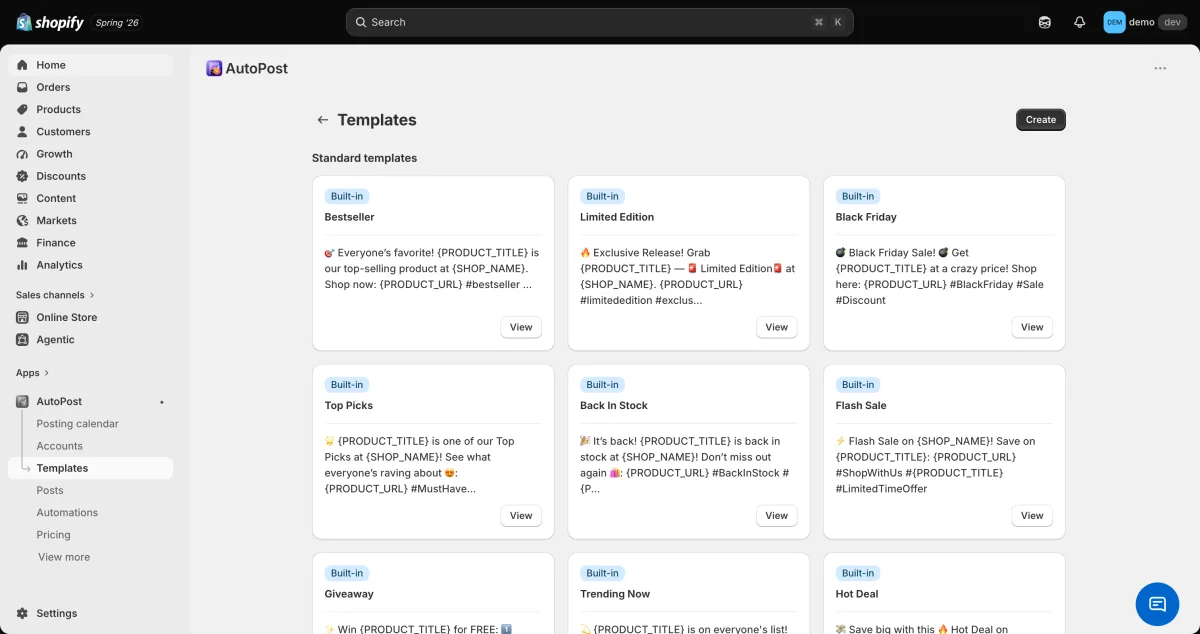
The template library ships with purpose-built themes: Bestseller, Limited Edition, Black Friday, Top Picks, Back In Stock, Flash Sale, Giveaway, Trending Now, and Hot Deal. Each template accepts variables like {PRODUCT_TITLE}, {SHOP_NAME}, and {PRODUCT_URL}, pulling copy directly from your catalog.
3. Composer and Post Flow
The composer steps are logical: product picker from your live Shopify catalog, media gallery (product images or custom uploads), template selection, AI caption generation, live network preview, then publish or schedule. Nothing about the flow is confusing.
4. Scheduling and Automations (paid only)
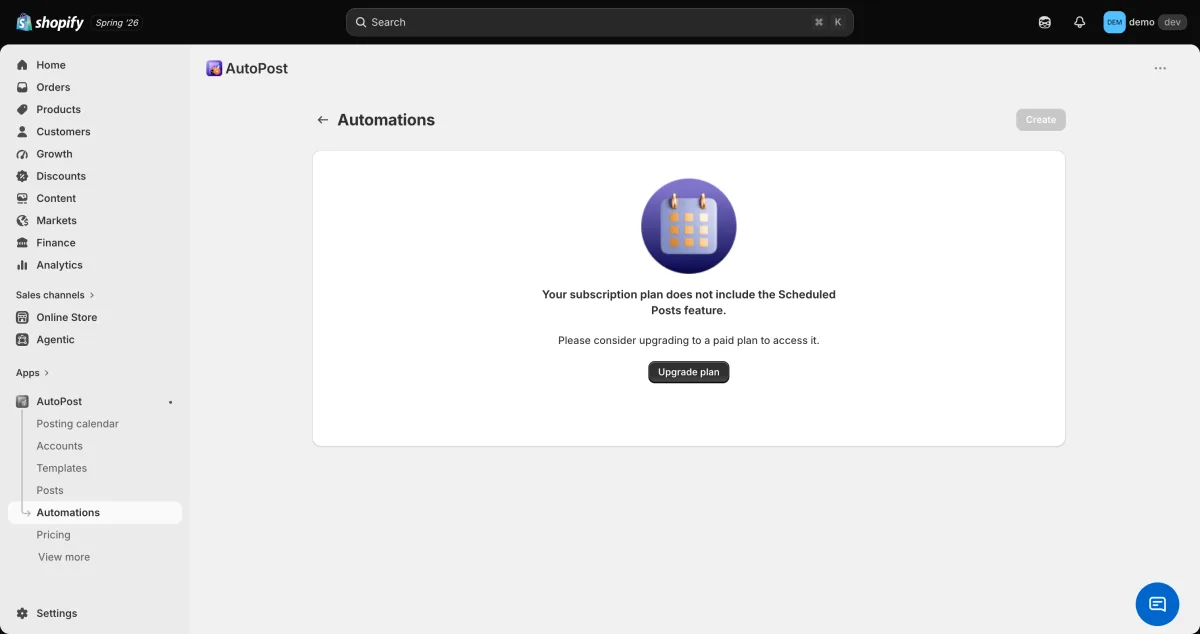
Scheduling future posts and trigger-based automations are gated behind the Basic plan ($9.99/month). The free plan is manual-only: every post must be manually initiated by the merchant each time.
This is the most important gating decision in the app. If you want AutoPost AI to post automatically without your involvement, you are on a paid plan from day one.
5. Calendar and Campaign Planning
A calendar view shows all scheduled and published posts. Campaign tools let you control publication order across multiple planned posts.
6. Dashboard Analytics
Daily and total posts published charts are visible on the main dashboard. This is basic output tracking only: no reach, impressions, clicks, or engagement data.
7. What AutoPost AI Does Not Do
- No video generation of any kind. Product videos can be attached to posts, but the app does not create or render video clips.
- No standalone hashtag suggestion tool (hashtags appear inside AI captions but there is no dedicated hashtag feature).
- No simultaneous cross-platform posting (Amasty lists this as a roadmap item).
- No Instagram Shopping tags, no shoppable video, no brand voice kit or approval queue.
Networks Supported
AutoPost AI supports 4 networks:
| Network | Supported |
|---|---|
| Yes | |
| Yes | |
| X/ |
Yes |
| Yes | |
| TikTok | No |
| YouTube | No |
| No | |
| Threads | No |
| Telegram | No |
| Discord | No |
No TikTok, no YouTube, no LinkedIn, no Threads. Multiple reviewers have specifically requested TikTok and the ability to post to all networks simultaneously. Amasty lists simultaneous cross-platform posting as a roadmap item, but additional network support (TikTok, YouTube, LinkedIn) has not been confirmed. If any of those missing networks are part of your strategy, AutoPost AI is not a current fit.
AutoPost AI: Ease of Use and UI
AutoPost AI is one of the cleaner, more approachable tools in this category.
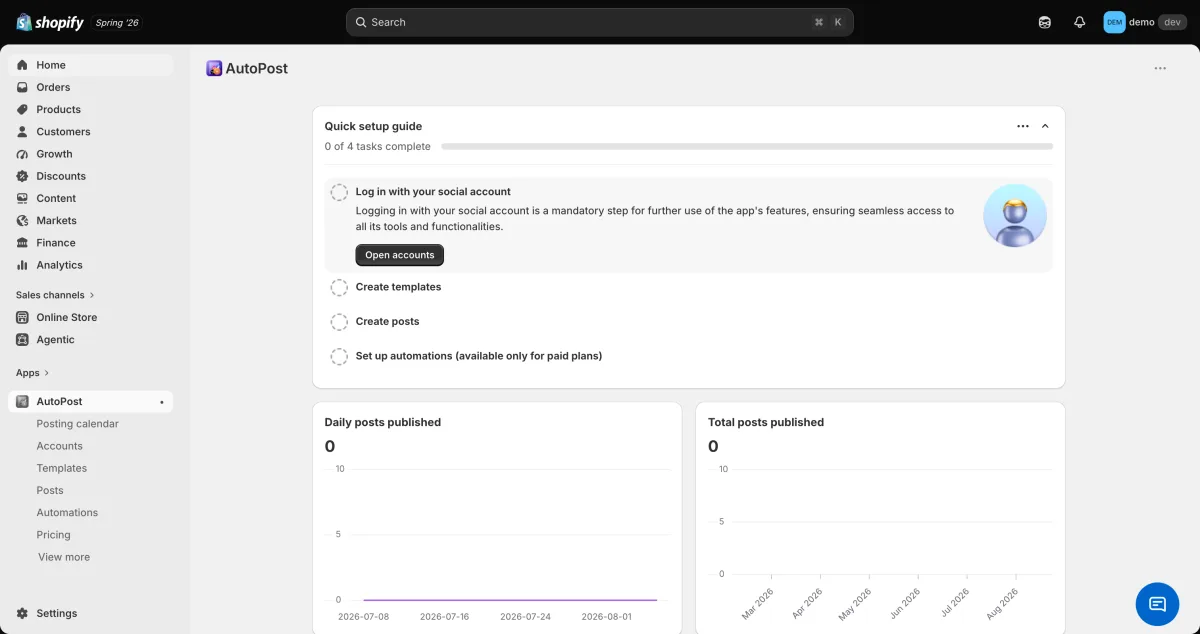
No hard connect-wall. The dashboard, template library, calendar, and settings are all explorable before you connect a social channel. Several competitors (SS Social Media AI, Minta, SocialPilot) block the entire app until you authenticate a channel, which makes AutoPost AI's open approach a genuine advantage.
Embedded in Shopify admin. No external domain to manage, no third-party login. Everything lives inside the Shopify admin interface merchants already use daily.
Quick-setup checklist. A four-step checklist is visible on the dashboard from the moment you install. Getting to first post is fast for a non-technical merchant.
Logical composer flow. Product picker, template, AI generate, preview, publish: exactly the order you would design yourself. Nothing is buried or surprising.
No instant generated content on install. Unlike Outfy (which auto-generates sample videos during onboarding) or Xyla AI (which builds a full week of content immediately), AutoPost AI shows a checklist rather than a wow moment. Merchants who need to see the product work before investing time may find the entry point flat.
AutoPost AI: Performance and Reliability
Live post confirmed. I published a real post to a live Facebook page on the free plan. Product catalog listed correctly, images displayed in the media gallery, AI captions were accurate, and the post went live. This was a full end-to-end test.
AI caption accuracy. The generated caption in my test included the correct product name, correct product URL, hashtags, and emojis. No hallucinated or stale content.
Reliability gap in reviews. The 1-star reviews (12% of all reviews, three out of 26) are all about the same issue: posts silently stop publishing while the subscription continues to charge. One reviewer stated: "NO posts for a month but my card is being charged and every social media site was 'connected.'" Amasty responds and investigates each complaint, but this pattern is worth knowing before you set up automated posting and step away from the dashboard.
No video to evaluate. AutoPost AI is image-only, so there was no video rendering reliability to test.
AutoPost AI: Support and Documentation
Amasty provides support via [email protected] and responds to every public App Store review, including the 1-star complaints. The in-app quick-setup guide and documentation are functional, if basic. There is no in-app chat, but the email support org is real.
Positive reviewers specifically call out Amasty's responsiveness as a differentiator. For a category where single-developer apps often go quiet after launch, having an established developer organization behind the product is a meaningful trust signal.
The 4.1/5 App Store rating falls in the mixed-to-good range. Responsiveness is genuine, but the reliability complaints suggest the team is still closing gaps on posting stability.
AutoPost AI: User Reviews and Reputation
I read all 26 public Shopify App Store reviews. Overall impression: mostly positive with a small but consistent reliability complaint thread.
Rating breakdown: 4.1/5 overall; 65% five-star (17 reviews), 12% four-star (3), 8% three-star (2), 4% two-star (1), 12% one-star (3).
What positive reviewers praise:
- Time savings from automation: "Easy Set Up and works really well...No more manual posting to all the social media outlets."
- Amasty's support responsiveness: praised across multiple positive reviews.
- AI output quality: described as natural, accurate, and on-brand. This matches my live test results.
What negative reviewers criticize:
- Reliability: posts not publishing despite accounts showing as connected, while billing continues. This is the only 1-star complaint theme.
- Missing networks: multiple reviewers want TikTok, YouTube, and the ability to post to all networks simultaneously with one action.
- Missing features: no standalone hashtag suggestion, no Spanish multilingual support despite the listing claim. Amasty lists both on the roadmap.
AutoPost AI Pricing and Value
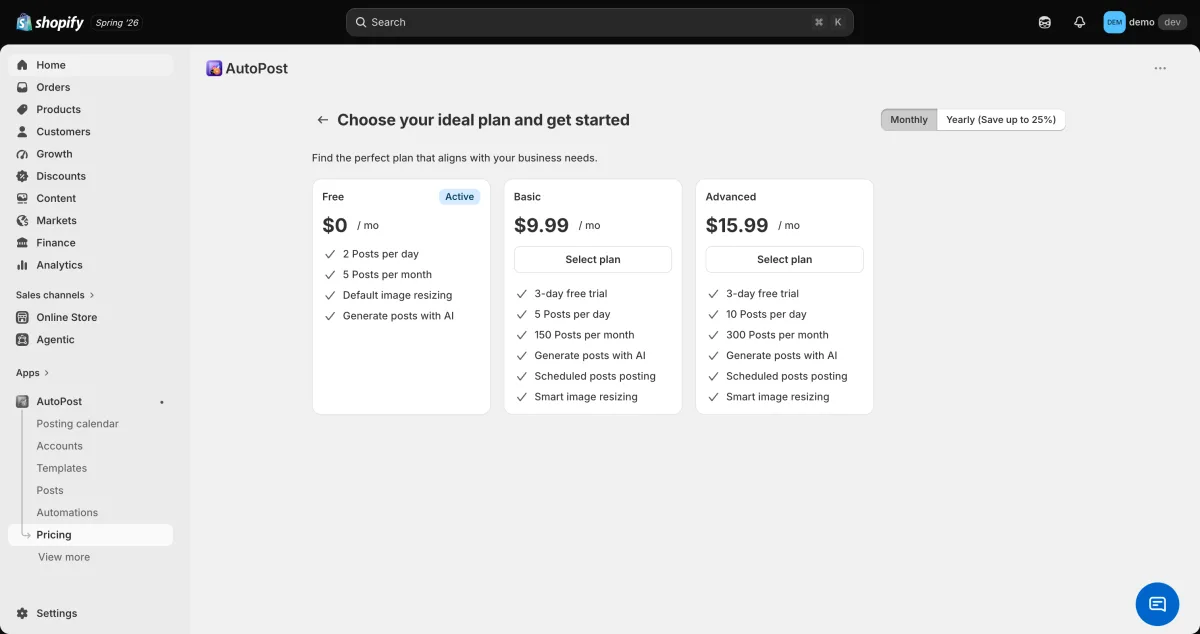
Three plans with annual discounts of approximately 20-25%:
| Plan | Monthly | Annual | Posts/ |
Posts/ |
Trial |
|---|---|---|---|---|---|
| Free | $0 | n/ |
2 | 5 | None |
| Basic | $9.99 | $95.88/ |
5 | 150 | 3-day |
| Advanced | $15.99 | $143.88/ |
10 | 300 | 3-day |
Key gating:
- Automations and scheduling: paid-only. Free plan = manual posting only.
- AI generations: 5 per post on free; unrestricted on paid.
- No credit metering on any plan.
Value assessment: For stores whose four target networks match AutoPost AI's four, the Basic plan at $9.99/month is straightforward and honestly priced. The free plan is real, but limited to manual posting at 5 posts/month. It works as a try-before-you-buy tier, but it is not a usable zero-cost automation solution.
AutoPost AI: Pros and Cons
Pros
1. Accurate AI captions. The ChatGPT integration pulls the correct product name, URL, hashtags, and emojis every time. Better than most rivals where AI output is generic or pulls wrong data.
2. Clean, frictionless setup. No hard connect-wall, no external account, no API key. Dashboard and templates are explorable before you commit a channel.
3. Amasty developer credibility. Established developer org, real support, responds to every review. Lower risk of abandonment than smaller single-developer apps.
4. No credit metering. AI generation uses no credits. You are not burning paid resources on output you haven't seen yet.
5. Honest, simple pricing. Three tiers, clear limits, real trials on paid plans. No misleading "free" entry that loops back to a paywall.
Cons
1. Only 4 networks. Facebook, Instagram, X/Twitter, Pinterest. No TikTok, YouTube, or LinkedIn. The top reason merchants leave the app.
2. Automations and scheduling are paid-only. Free plan is manual-only. Real auto-posting requires at least $9.99/month.
3. Reliability complaints in 1-star reviews. Posts silently failing while billing continues is a small but consequential failure mode.
4. No video generation. Image-only at every plan level. Video requires a different tool.
5. No simultaneous cross-platform posting. Each post targets one network. Three networks means three separate posts.
Who Should Use AutoPost AI? And Who Should Skip It?
Who Should Use It
- Stores focused on Facebook, Instagram, X/Twitter, and Pinterest. If your four channels match the app's four networks, the constraint is irrelevant.
- Merchants who value developer track record. Amasty's established org and active roadmap reduce the risk of an abandoned tool.
- Stores that want accurate AI captions without credit metering. Predictable output without burning credits you haven't previewed.
- Merchants who want a low-risk evaluation. The 3-day trial on paid plans is a real evaluation window.
Who Should Skip It
- Stores that need TikTok, YouTube, or LinkedIn. Not supported today.
- Merchants who need free auto-posting. Free plan is manual-only; automations start at $9.99/month.
- Stores that need video content. AutoPost AI is image-only.
- Merchants who post to multiple networks simultaneously. Cross-platform simultaneous posting is not yet available.
Best AutoPost AI Alternatives
AutoPost AI's main gaps are 4 networks only, no video generation, and automations behind a paywall. The two most direct alternatives are Yoomru (Shopify App Store), which covers 11 networks including TikTok, YouTube, and LinkedIn with free auto-posting and branded product video, and VibeFlow, which adds TikTok and YouTube to a similarly clean Shopify-embedded experience with a free plan. For a full ranked list, see the AutoPost AI alternatives guide.
Final Verdict: Is AutoPost AI Worth It?
AutoPost AI is a solid, honest Shopify social poster for merchants who post to Facebook, Instagram, X/Twitter, and Pinterest. Amasty's developer credibility, responsive support, and accurate AI captions make it a lower-risk choice than many newer or single-developer rivals. The pricing is transparent, the setup is fast, and what the app promises it mostly delivers.
The two caveats to weigh before committing: the 4-network ceiling is a hard limit with no workaround today, and the reliability thread in the 1-star reviews describes a failure mode (silent posting stoppage while billing continues) that is consequential for any automated workflow.
If your target networks are the four AutoPost AI supports, and you are comfortable on a paid plan for automation, it is a reasonable choice. If you need TikTok, YouTube, LinkedIn, or video content, or you want free individual post scheduling plus a path to automation without switching apps, Yoomru covers those gaps more completely.
AutoPost AI FAQ
Is there a free version of AutoPost AI? Yes. The free plan allows 5 posts per month (maximum 2 per day) and up to 5 AI caption generations per post. It is manual-only: scheduling and automations require the Basic plan at $9.99/month.
Which social networks does AutoPost AI support? Four networks: Facebook, Instagram, X/Twitter, and Pinterest. TikTok, YouTube, LinkedIn, and Threads are not currently supported. Amasty's listed roadmap items are simultaneous cross-platform posting and hashtag/emoji generation; additional network support has not been confirmed.
Does AutoPost AI use a credit system? No. AI caption generation is not credit-metered. Free plan users get 5 generations per post; paid users get unrestricted generation. You are not charged per caption or per post creation.
Can AutoPost AI post to multiple networks at the same time? Not yet. Each post targets one network at a time. Simultaneous cross-platform posting is listed by Amasty as a roadmap item.
What are the best alternatives to AutoPost AI? If you need more networks (especially TikTok, YouTube, or LinkedIn), video content, or auto-posting capabilities beyond what the free tier offers, the strongest alternative is Yoomru, which supports 11 networks, includes branded product video from the Starter plan, and offers free individual post scheduling. For other proven multi-network options, VibeFlow (4.9/5, 6 networks, free plan) and SS Social Media AI (4.9/5, 6 networks including LinkedIn, trial-only) are also worth evaluating.